


Best Western To Go
4.42.87K Reviews
App Specs
- Version
- 7.4.12
- Updated On
- License
- Free
- Downloads
- 1,000,000+
- Developer
- Best Western International Inc.
- Categories
- Travel & Local
- Platform
- Android, iOS
Screenshots
 Analysis by AppCompare
I find Best Western To Go most useful when a trip is likely to include a Best Western stay and I want the booking and reservation details close at hand. It is a focused travel companion, not a universal trip planner: that distinction matters. If you already choose this hotel group, bringing the search and stay into one place can reduce small hassles; if you shop across many chains for the lowest rate, a broader booking service may suit you better.
Best Western International Inc. makes the free Travel & Local app, which has been available since November 2, 2010. Its current version is 7.4.11, and it requires iOS 9 or later. It has a 4.5 average from around 29,000 ratings and more than 1 million installs. Those figures suggest an established app, but I would treat them as context rather than a promise that every hotel interaction will work the same way. The audience rating is Teen.
What works best when a hotel is already in your plans
The central advantage is focus. Instead of starting with a broad search across lodging brands, I can look for Best Western properties, compare the options presented, and keep the reservation tied to the same hotel group. That is especially handy when I am returning to a place where I already know which kind of stay I prefer. The app is at its strongest when I want to make a straightforward hotel decision, rather than research every possible accommodation.
For a road trip, location-based searching has a practical role: it can help turn an uncertain overnight stop into a short list of nearby properties. I would still check the address and route before committing, particularly if I am arriving late or travelling through an unfamiliar area. A result that appears nearby is a starting point, not a substitute for checking how convenient the hotel is for the actual drive.
Reservation management is another sensible reason to keep the app installed. When plans shift, having the booking in the same place I used to find the hotel is easier than hunting through old messages. My useful habit would be to open the reservation after booking, verify the dates and property, then keep a separate record of any important travel details I cannot afford to lose. That takes little effort and avoids relying on memory during a busy travel day.
Rewards and planning without overcomplicating a trip
The loyalty connection is most valuable to travellers who already use Best Western Rewards or expect to stay with the group again. Seeing the program alongside a booking makes it easier to keep the hotel choice and rewards activity connected. I would not choose a hotel on points alone, though. Location, room suitability, and the full booking terms should still decide whether a property makes sense for a particular night.
The planning tools can help with a simple itinerary: save destinations, gather trip details, and use a calendar connection to keep plans visible alongside other commitments. That is useful for a weekend with a few fixed stops, or for a work trip where arrival and departure days are easy to mix up. It is less compelling if you already manage a detailed itinerary in a dedicated planner, since maintaining the same plan in two places can create extra work rather than save it.
Worth Reading Before You Choose

EA SPORTS FC Mobile 26 Is a Bigger Football Game, but It Takes Time

Flipboard Shows What News Apps Must Do Beyond the Feed

Switching to Android Auto Means Rethinking Your Driving Routine

Google Calendar Makes a Crowded Week Easier to Manage

Ludo King Makes the Most of the Minutes Between Plans

Baby Panda World Brings Quick Play to Modern Phones, but Its Game Library Feels Busy
A small but useful workflow is to decide the route first, shortlist the nights when a Best Western property is a good fit, and then use the app for those specific hotel searches. This keeps the app from becoming the place where I try to solve every part of a trip. I can use other tools for flights, broader accommodation comparisons, or activities, while keeping this one focused on the stays it is built around.
Where the convenience has limits
A brand-specific search is also the main trade-off. If I need to compare Best Western with independent hotels and other chains in the same view, I would turn to a broader booking app or search service. Those alternatives are better suited to a wide-open comparison; this app is more convenient once I have decided that Best Western is among my choices. That is not a flaw so much as a boundary worth understanding before planning around it.
Likewise, features connected to a hotel stay should not be treated as guarantees. A request for a late checkout or an extra amenity is convenient to send through the app, but the hotel still has to be able to accommodate it. I would submit requests early when possible and confirm anything essential directly with the property. The same common-sense check applies to directions and nearby suggestions: useful for orientation, but I would verify the details when timing or accessibility matters.
The app makes the most sense when I am comfortable keeping another travel account and app in my routine. Occasional travellers who simply need one room may find a mobile browser or a general booking service enough. On the other hand, someone who regularly stays with Best Western can benefit from having the booking, loyalty connection, and trip information within one brand-focused tool.
A practical fit for the right kind of traveller
Imagine I am driving to visit family, the trip will take more than a day, and I have not settled on the overnight stop. I can check Best Western options around the route, compare the available choices shown, and book when one fits the location and budget I have in mind. Before setting off, I can revisit the reservation and make sure I am heading to the right property. That is a realistic use of the app: it supports a hotel decision without pretending to plan the whole journey.
For a family trip, the same approach can help keep the lodging detail accessible to whoever is coordinating the travel. I would share the confirmed address and reservation details with the other adults in the group rather than assume everyone can see or access my account. For a business traveller, the value is less about discovery and more about keeping a familiar hotel booking easy to find between meetings and transport arrangements.
My advice is to check the app before the pressure of the trip begins. Search while you have time to compare the location and room options, then review the booking confirmation before travel. If you are already on the road, location search can be useful, but a weak signal, a rushed decision, or a last-minute change is a good reason to verify the reservation through a second channel as well. This is a practical backup habit, not a reason to distrust the app.
Getting Started
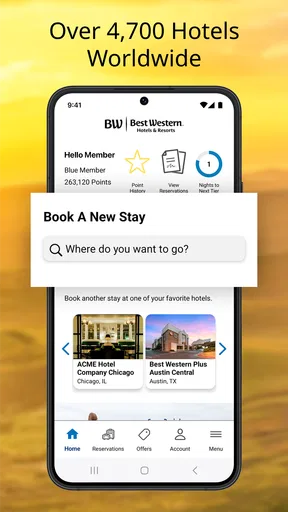
The first thing you’ll notice when you download the Best Western To Go app is its sleek and user-friendly interface. Setting it up is a breeze. You just create an account or log in using your existing Best Western Rewards details. And just like that, you're ready to explore a world of travel possibilities!
Once you're in, the home screen offers a clean layout with easy navigation. You can search for hotels, book your stay, and even manage your reservations all in one place. It’s like having a personal travel assistant who never sleeps.
Exploring Features
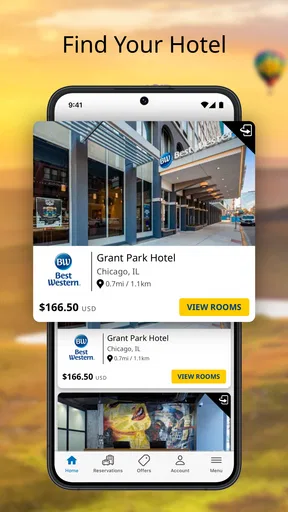
One of the standout features is the ability to search for hotels based on your current location. This is super handy, especially when you're on a road trip and spontaneity is key. The app pulls up a list of nearby Best Western hotels complete with details like amenities and guest ratings.
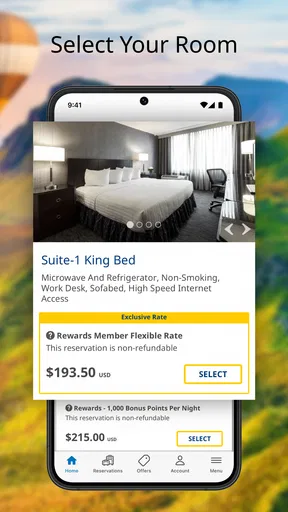
Booking a room is straightforward. The app displays available rooms, pricing, and any special offers. I particularly loved the rewards integration – earning and redeeming points during your stay is seamless. Who doesn't love a good reward?
Another cool feature is the ability to create travel itineraries. You can organize your plans, save travel destinations, and even sync them with your calendar. It's like having a digital itinerary that keeps you on track without a hitch.
On the Road
When you're actually on your trip, the app proves its worth big time. Need directions to the hotel? The integrated map feature has got you covered. Looking for dining options nearby? The app provides recommendations based on your location. It's these little things that make traveling less stressful.
What really caught my attention was the ability to share your travel plans with friends or family. A simple tap, and they’re updated on your whereabouts. It adds a layer of security and keeps everyone in the loop, which is always a plus when traveling.
Staying Connected
While you’re enjoying your stay, the app keeps you informed with notifications about check-in and check-out times. You can even request a late check-out or additional amenities directly from the app. It's all about making your stay as comfortable and hassle-free as possible.
And if you ever need assistance, the customer support feature connects you directly with the hotel staff. No more waiting on hold or dealing with automated responses. It's all instant and personal, just the way it should be.
Final Thoughts
Overall, Best Western To Go is a travel essential for anyone who frequents Best Western hotels or just loves a well-organized trip. The convenience factor alone makes it worth downloading. Whether you're planning a weekend getaway or a cross-country adventure, this app is designed to keep your travel plans smooth and enjoyable.
So, if you're looking for a travel app that combines the practicality of booking with the perks of a loyalty program, give Best Western To Go a try. It’s like having your own travel genie – minus the three wishes, of course!
Pros
- User-friendly interface for easy navigation.
- Convenient trip planning and booking features.
- Access to exclusive member rates and rewards.
- Real-time updates on reservations and availability.
- Integrated maps for quick location searches.
Cons
- Limited customization options for preferences.
- Occasional slow loading times on older devices.
- Some features require stable internet connection.
- Notifications can be overly frequent and intrusive.
- In-app support options are somewhat limited.
FAQs for Best Western To Go
What is Best Western To Go and what features does it offer?
Best Western To Go is a travel app designed to enhance your hotel booking experience. It offers features such as booking management, trip planning, mapping and directions, and access to exclusive deals and promotions. Users can also save favorite hotels and access previous stays, making it easier to organize future trips.
Is the Best Western To Go app free to download and use?
Yes, the Best Western To Go app is free to download on both Android and iOS devices. While downloading and using the app is free, booking a stay will involve costs as per the hotel rates. The app may offer exclusive discounts and deals to users, providing potential savings.
How user-friendly is the Best Western To Go app for first-time users?
The Best Western To Go app is designed with a user-friendly interface, making it easy for first-time users to navigate. It includes intuitive features like simple search functions, easy access to booking history, and personalized trip organization tools. The app also offers customer support for any assistance needed during the booking process.
Can I manage my Best Western Rewards account through the app?
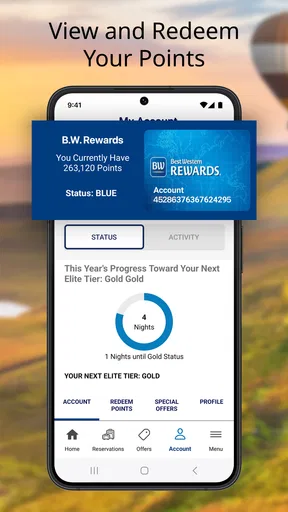
Yes, the Best Western To Go app allows users to manage their Best Western Rewards account directly. You can track points, view account status, and redeem rewards for free nights and other perks. This integration provides a seamless experience for members looking to maximize their rewards while traveling.
What security measures are in place to protect my information on the Best Western To Go app?
The Best Western To Go app employs robust security measures to ensure your personal and payment information is protected. This includes encryption protocols and secure payment gateways. Users can feel confident that their data is handled with care, aligning with industry standards for privacy and security.


